


Volvo Cars
3.62.01K Reviews
App Specs
- Version
- 7.2.0
- Updated On
- License
- Free
- Downloads
- 1,000,000+
- Developer
- Volvo Cars
- Categories
- Auto & Vehicles
- Platform
- Android, iOS
Screenshots
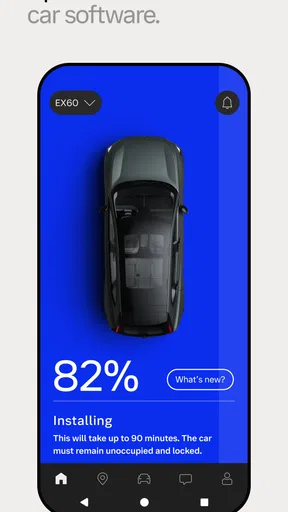
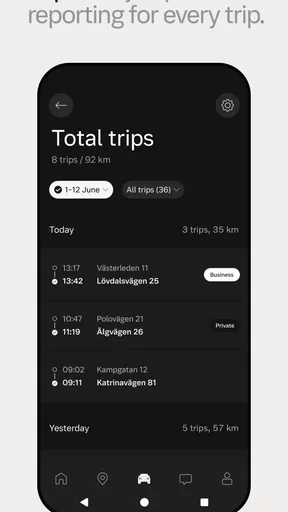
 Analysis by AppCompare
I first think about where a car app fits into an ordinary day: I’m away from the vehicle, unsure whether I locked it, or trying to make the next trip less rushed. For a Volvo owner, the Volvo Cars app puts several car-related tasks on a phone rather than leaving them scattered between the dashboard, a paper manual, and a call to a service center. It is a free Auto & Vehicles app from Volvo Cars, available for Android and iOS, and its appeal is strongest when you already drive a Volvo and want a convenient connection to it.
Starting with the car, not the phone
The useful first question is whether the app matches your vehicle and the things you want to do. It is not a general-purpose driving tool that makes the same promise for every car: its purpose is to connect you with a Volvo. The practical experience can therefore depend on the vehicle and the functions available for it. Before building a routine around remote controls or status checks, I’d install it, connect the car as directed in the app, and see which options appear for my own vehicle.
That small check matters. If your main goal is simply to find directions, a familiar mapping app may be all you need. If you want one place to check on a Volvo, manage selected vehicle functions, and reach car-specific information, this app has a more relevant role. I would treat it as a companion to the vehicle rather than a replacement for every driving app on the phone.
Your Volvo, Your Way
So, what’s the big deal about the Volvo Cars app? First off, it’s all about personalization. You can tailor the app’s interface to suit your preferences, making your experience as unique as your driving style. From adjusting the climate control to setting up a navigation route, it’s all just a tap away. And honestly, who doesn't love a bit of customization?
Remote Control: Like a Boss
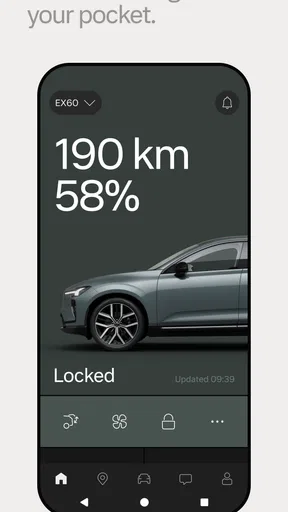
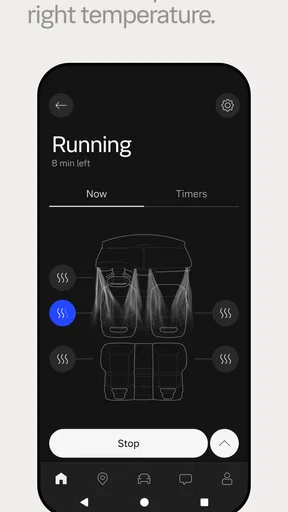
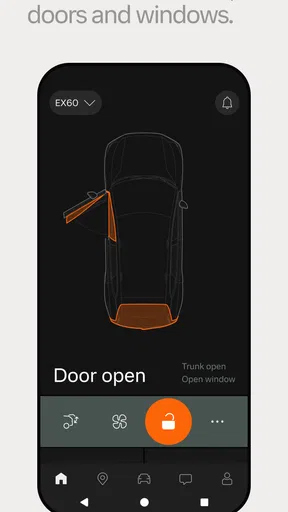
One standout feature is the remote control functionality. Imagine you’re sitting in your cozy living room during a freezing winter morning. With the app, you can start your car and warm it up before even stepping outside. It’s like having a remote start but with way more options. You can even lock and unlock your car from your phone, which is a godsend if you're like me and always second-guessing whether you remembered to lock it.
For this kind of control, I’d use the app as a quick check rather than as a reason to stop paying attention to the car’s ordinary safeguards. A realistic example is arriving at work and wondering whether I locked the doors: checking the vehicle in the app is more practical than walking back across a large parking lot. In cold weather, preparing the car before leaving home can also make the handoff from indoors to driving more comfortable. The important trade-off is that a phone command depends on the connection and on the vehicle supporting that function, so I would not make a time-critical plan that assumes every tap will work instantly.
Safety First
Volvo is synonymous with safety, and the app doesn’t fall short in this department. You can check your car’s status, including fuel levels, battery status, and even tire pressure. It’s like having a mini mechanic in your pocket. The app will notify you if something needs attention, so you’re always in the know without having to pop the hood.
Worth Reading Before You Choose

Flipboard Shows What News Apps Must Do Beyond the Feed

Switching to Android Auto Means Rethinking Your Driving Routine

Google Calendar Makes a Crowded Week Easier to Manage

Ludo King Makes the Most of the Minutes Between Plans

Baby Panda World Brings Quick Play to Modern Phones, but Its Game Library Feels Busy

ESPN’s Live Game View Makes Following Close Games Easier
I see these checks as useful context, not a remote inspection or a substitute for maintenance. A quick look before a longer drive can help me notice that something deserves attention while I still have time to deal with it. If a warning or reading raises concern, the sensible next step is to consult the vehicle’s guidance or arrange appropriate service rather than assuming the app can diagnose the cause. That distinction keeps a convenient status screen from being mistaken for a mechanic’s assessment.
Navigation and Beyond
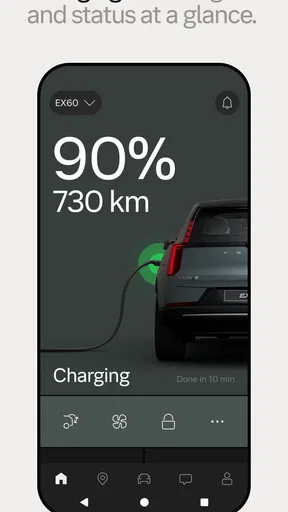
The navigation feature is another highlight. You can plan your trips ahead of time and send directions directly to your car’s GPS. No more fiddling with the screen while trying to keep your eyes on the road. Plus, the app includes a map of charging stations if you’re driving an electric Volvo, which is super handy for planning long trips.
The best workflow here is to decide on the destination while parked, send it to the car, and then use the in-car system for the drive. That handoff reduces the temptation to type an address after setting off. For an electric Volvo, the charging-station map can help with a first pass at planning, but I would still check the route and charging stops against the needs of the actual journey before relying on them. A dedicated navigation app may offer a different style of route planning; the advantage here is keeping a trip tied to the Volvo rather than starting from scratch at the dashboard.
Connection to the World
Let’s not forget about the connectivity features. The app integrates seamlessly with your calendar, pulling in appointments and suggesting routes based on your schedule. It’s a bit like having a personal assistant who’s always on top of things. And for those who love music, you can control your in-car entertainment system, ensuring your playlists are always ready to go.
Calendar-based planning is most useful when the day already has a clear destination and timing matters: I can review what is coming up before I get into the car instead of juggling an appointment and a navigation screen at once. I would still check the suggested destination and timing myself, especially if plans change. For music, the benefit is convenience at the car end of the process, while a music app remains the place I’d manage playlists and listening preferences. The Volvo app is helpful as a bridge, not a reason to abandon tools that already work well for those separate tasks.
Making Life Easier
Beyond the amazing tech, what I love most about the app is how it simplifies life. Whether it’s finding your car in a packed parking lot or scheduling a service appointment with just a few taps, it’s all about making your life easier. You can even access the owner’s manual through the app, which is perfect for those moments when you need a quick answer about your vehicle’s features.
The manual is one of the less flashy but more practical parts of this setup. If I’m unsure what a control or indicator means, checking vehicle-specific guidance is a better first move than relying on a random search result that may describe a different model. Service scheduling can also make the transition from noticing a need to arranging help more direct. I would still keep any appointment details and service decisions clear, but having vehicle information and service access together makes the app useful even on days when I never touch a remote-control button.
Who will get the most from it
I’d recommend trying it if you own a Volvo and expect to use more than one of its connected conveniences: checking the car, preparing for a trip, finding vehicle guidance, or dealing with service. The strongest case is for someone who regularly moves between home, work, and errands and likes to check details before reaching the vehicle. It can also suit an electric Volvo driver who wants the charging-station map available alongside trip planning.
On the other hand, if you do not drive a Volvo, this is not the right choice as your everyday driving hub. Even as a Volvo owner, you may not need it if you only want turn-by-turn directions and already prefer another navigation app. Drivers who rarely use connected controls may find that the app adds another account and interface to maintain without changing their routine much. I’d install it when its vehicle-specific tools solve a task I actually have, rather than expecting a phone app to improve every part of driving automatically.
How it fits beside familiar alternatives
Compared with a general map app, Volvo’s app is more closely tied to the vehicle: it can bring together car status, selected remote functions, vehicle information, trip handoff, and service-related tasks. A standard navigation app is usually the simpler choice when all I need is a route, especially if I already use it for places and saved destinations. The two approaches can complement one another. I can plan in the tool that suits the task, then use the Volvo app where a vehicle-specific connection makes the process more useful.
It also differs from relying only on the car’s dashboard. The dashboard is where I need driving information once I’m seated, while the phone is handy before departure or when I’m away from the car. That separation is a genuine strength, but it does not remove the need to use the vehicle’s own controls and displays responsibly. I would set up the app and explore its options while parked, then keep attention on the road once the trip begins.
Where the routine can stumble
Connected features are only valuable when they fit the particular car and work in the moment. A command that depends on the phone, the vehicle, and their connection is less dependable as a last-second solution than a task I can handle directly at the car. I’d also avoid treating an app notification as a full explanation of a mechanical issue. Status information can point me toward something to check, but it cannot replace a careful look at the vehicle or professional service when needed.
There is also a learning curve if I only open the app occasionally. I might forget where a control lives or overlook a useful section until I need it in a hurry. My practical tip is to spend a few minutes exploring the connected controls, manual, and trip options while parked, then keep the features I actually use easy to find. That makes the app less of a novelty and more of a dependable part of a routine.
The app has been available since June 4, 2014, and its current version is 6.10.0. It requires Android 8.0 or later, is rated for Everyone, and is free to install. Its average rating is 3.7 from around 59,000 ratings, with about 2,000 reviews, and it has over a million installs. I take that as a reason to approach it with practical expectations: it is a substantial, established companion for Volvo owners, but the value still comes down to whether its connected features match your car and habits.
In a nutshell, the Volvo Cars app is like carrying a tiny version of your car in your pocket, equipped with all the bells and whistles to make driving and managing your vehicle a breeze. It’s a tech-savvy driver’s best friend, combining convenience, safety, and connectivity into one sleek package.
If you’re a Volvo owner and haven’t yet downloaded the app, you’re seriously missing out. Trust me, once you start using it, you’ll wonder how you ever got along without it. So go ahead, give it a whirl and enjoy the seamless connection it brings to your driving experience.
Pros
- User-friendly interface for easy navigation.
- Comprehensive vehicle status overview.
- Remote control for car functions.
- Seamless integration with smart devices.
- Regular updates enhance app performance.
Cons
- Limited features for non-Volvo owners.
- Some functions require premium subscription.
- Occasional connectivity issues reported.
- Battery drain on older devices.
- Limited language support for some regions.
FAQs for Volvo Cars
What features does the Volvo Cars app offer?
The Volvo Cars app provides a range of features designed to enhance your driving experience. These include remote start and stop, climate control, car locator, and driving journal. You can also schedule maintenance, check fuel levels, and receive notifications about your vehicle's status.
Is the Volvo Cars app compatible with all Volvo models?
The Volvo Cars app is compatible with most recent Volvo models, particularly those equipped with the latest technology packages. However, compatibility can vary based on the model year and specific features of your vehicle. It’s recommended to check with Volvo or the app’s description for precise compatibility details.
How secure is the data in the Volvo Cars app?
Volvo prioritizes user security and employs advanced encryption methods to protect your data. The app requires secure login credentials and offers features like two-factor authentication to ensure that only authorized users can access vehicle information and control features remotely.
Does the Volvo Cars app require a subscription or additional fees?
While downloading the Volvo Cars app is free, some features may require a subscription to Volvo On Call, a service that provides enhanced connectivity and support. Pricing and availability of these services can vary based on your location and vehicle model.
Can I control multiple vehicles with the Volvo Cars app?
Yes, the Volvo Cars app allows you to manage multiple vehicles within the same account. You can easily switch between different vehicles, accessing unique features and status updates for each one. This is particularly useful for families or individuals with more than one Volvo vehicle.


